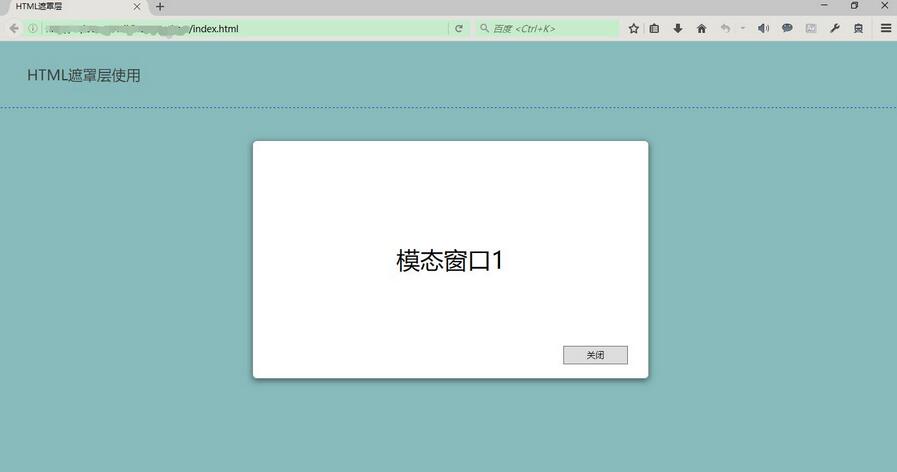
实现思路:一个DIV作为遮罩层,一个DIV显示loading动态GIF图片。在下面的示例代码中,同时展示了如何在iframe子页面中调用显示和隐藏遮罩层。
示例代码:
index.html
XML/HTML Code复制内容到剪贴板
HTML遮罩层 - HTML遮罩层使用

index.css
CSS Code复制内容到剪贴板
- * {
- margin: 0;
- padding: 0;
- }
- html, body {
- width: 100%;
- height: 100%;
- font-size: 14px;
- }
- div.header {
- width: 100%;
- height: 100px;
- border-bottom: 1px dashed blue;
- }
- div.title-outer {
- position: relative;
- top: 50%;
- height: 30px;
- }
- span.title {
- text-align: left;
- position: relative;
- left: 3%;
- top: -50%;
- font-size: 22px;
- }
- div.body {
- width: 100%;
- }
- .overlay {
- position: absolute;
- top: 0px;
- left: 0px;
- z-index: 10001;
- display:none;
- filter:alpha(opacity=60);
- background-color: #777;
- opacity: 0.5;
- -moz-opacity: 0.5;
- }
- .loading-tip {
- z-index: 10002;
- position: fixed;
- display:none;
- }
- .loading-tip img {
- width:100px;
- height:100px;
- }
- .modal {
- position:absolute;
- width: 600px;
- height: 360px;
- border: 1px solid rgba(0, 0, 0, 0.2);
- box-shadow: 0px 3px 9px rgba(0, 0, 0, 0.5);
- display: none;
- z-index: 10003;
- border-radius: 6px;
- }
index.js
JavaScript Code复制内容到剪贴板
- function rightIFrameLoad(iframe) {
- var pHeight = getWindowInnerHeight() - $('#header').height() - 5;
- $('div.body').height(pHeight);
- console.log(pHeight);
- }
- // 浏览器兼容 取得浏览器可视区高度
- function getWindowInnerHeight() {
- var winHeight = window.innerHeight
- || (document.documentElement && document.documentElement.clientHeight)
- || (document.body && document.body.clientHeight);
- return winHeight;
- }
- // 浏览器兼容 取得浏览器可视区宽度
- function getWindowInnerWidth() {
- var winWidth = window.innerWidth
- || (document.documentElement && document.documentElement.clientWidth)
- || (document.body && document.body.clientWidth);
- return winWidth;
- }
- /**
- * 显示遮罩层
- */
- function showOverlay() {
- // 遮罩层宽高分别为页面内容的宽高
- $('.overlay').css({'height':$(document).height(),'width':$(document).width()});
- $('.overlay').show();
- }
- /**
- * 显示Loading提示
- */
- function showLoading() {
- // 先显示遮罩层
- showOverlay();
- // Loading提示窗口居中
- $("#loadingTip").css('top',
- (getWindowInnerHeight() - $("#loadingTip").height()) / 2 + 'px');
- $("#loadingTip").css('left',
- (getWindowInnerWidth() - $("#loadingTip").width()) / 2 + 'px');
- $("#loadingTip").show();
- $(document).scroll(function() {
- return false;
- });
- }
- /**
- * 隐藏Loading提示
- */
- function hideLoading() {
- $('.overlay').hide();
- $("#loadingTip").hide();
- $(document).scroll(function() {
- return true;
- });
- }
- /**
- * 模拟弹出模态窗口DIV
- * @param innerHtml 模态窗口HTML内容
- */
- function showModal(innerHtml) {
- // 取得显示模拟模态窗口用DIV
- var dialog = $('#modalDiv');
- // 设置内容
- dialog.html(innerHtml);
- // 模态窗口DIV窗口居中
- dialog.css({
- 'top' : (getWindowInnerHeight() - dialog.height()) / 2 + 'px',
- 'left' : (getWindowInnerWidth() - dialog.width()) / 2 + 'px'
- });
- // 窗口DIV圆角
- dialog.find('.modal-container').css('border-radius','6px');
- // 模态窗口关闭按钮事件
- dialog.find('.btn-close').click(function(){
- closeModal();
- });
- // 显示遮罩层
- showOverlay();
- // 显示遮罩层
- dialog.show();
- }
- /**
- * 模拟关闭模态窗口DIV
- */
- function closeModal() {
- $('.overlay').hide();
- $('#modalDiv').hide();
- $('#modalDiv').html('');
- }
body.html
XML/HTML Code复制内容到剪贴板
body 页面 运行结果:
初始化
显示遮罩层和Loading提示
显示遮罩层和模拟弹出模态窗口

Copyright © 2019-2025 51dongshi.net 版权所有
违法及侵权请联系:TEL:177 7030 7066 E-MAIL:11247931@qq.com 本站由北京市万商天勤律师事务所王兴未律师提供法律服务